Share links and QR codes
A Splashery link does not point at your scene. It is your scene. Open the Share tab of the More sheet, copy the link, and the whole Splash (its options, the look, the camera, any paint) is written into the web address itself. This chapter takes one apart, lets you make one, and shows how the same link fits in a QR code.
What is in a link
The link has four parts, from left to right:
https://splashery.app/#s=d.eJxVjkEOgzAM…
- The page. The ordinary address of the app. The browser asks the server for this part and nothing more.
-
#s=, the start of the fragment. A browser never sends the fragment (everything after the#) to a server, so the scene is not in any request. The page reads it with script after it loads (parseHashinsrc/splashery/codec.js). -
A format letter and a dot:
d.means the rest is compressed, andj.means it is not (the next paragraph says when). -
The scene. The scene as JSON text (its shape is set by
normalizeSceneinsrc/splashery/state.js), turned into bytes as UTF-8, compressed with raw deflate (the same method as a zip file, without the zip's wrapper), and written with the 64 letters, digits,-and_that are safe in an address (base64url).
The j. form exists for a browser that cannot compress (no
CompressionStream): it is the same JSON, written in base64url but not
compressed. It is not readable as text, only safely spelled. Any browser reads either form
if it can decompress, and every current browser can.
A link can also end with &n= and a number, the splat count, as in
#s=…&n=300000. It is not one of the four parts because it is optional: a
link with no n opens the Splash at its own count, and the Splats slider sets
it. The first links the Playground made, such as
#toy=grape&n=300000&v=yaw,pitch,zoom, still open.
It is not a hash of anything, and not a lookup. Some sites make a short link by saving your data on a server and handing you a key. Splashery cannot do that, because it has no server (the previous chapter). Nothing is stored anywhere. The link is the only copy of the scene, which is why you can send it in a message and the other person sees exactly your Splash, and why a scene you did not copy the link of is not recoverable from the site.
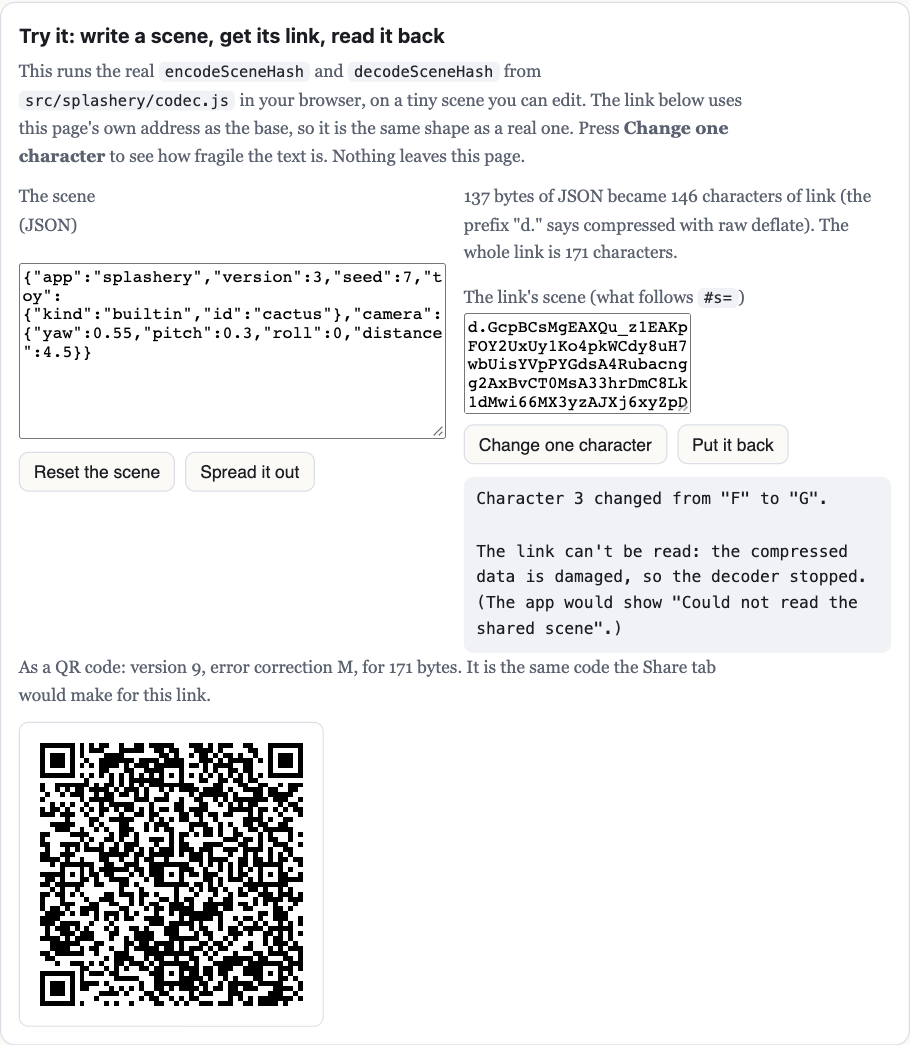
Why one changed character usually breaks it
Compressed text is not like ordinary text. In a sentence, a wrong letter is one wrong
letter. In a deflate stream each bit tells the decoder how to read the bits after it (which
code table, how far back to copy from), so one changed character changes how everything
after it is read. The decoder then either stops with an error (decodeSceneHash
throws, and the app shows "Could not read the shared scene"), or produces text that is no
longer valid JSON, which stops at JSON.parse. Rarely, the changed character
lands on a spare bit at the very end or turns one letter inside a word of the JSON into
another, and the link still works with a slightly different scene. That is the "usually". Do
not edit a link by hand to change a setting. Change the setting in the app and copy the new
link.
When a link does decode, the app does not trust it. The JSON goes through
normalizeScene (src/splashery/state.js), which drops keys it does
not know, clamps every number to its allowed range, and fills in anything missing with its
default. The demo shows the result of that step below the decoded text.
Old links keep loading
A link made last month must open next year. The scene has a version number, and
normalizeScene reads old ones. Version 3 is the current schema. A
version 2 link is a version 3 scene without the pattern, the motion, and the options
on shelf Splashes; it loads, and those take their defaults. A version 1 file (the old planet
painter) is refused with a message that says so, and so is a scene from a newer Splashery
than the one you are running. Saving always writes the current version. The project's rules
require this, and a check opens old links to make sure they still load.
The same applies to the embed player and the <splashery-toy> element,
which read the same links (embed/, src/element.js).
How long a link can be
A Splash at its defaults is a link of about 220 characters. Paint and clay are the things
that grow, because every dab or stroke is written into the scene. The link has no limit of
its own: writeScene (src/scene.js) writes the whole scene, however
long, and leaves nothing out to shorten it. A link carries settings, not your files:
a photo or splat file from your device has to be opened again by whoever opens the link.
A scene as a QR code
A QR code is a picture of bytes, and the link is just text, so any link can be one. The Share tab of the More sheet always shows a QR code of the same link as the Copy button, which you can scan with a phone camera (it has no Save button). The code holds only the link. Nothing is uploaded, and your own files stay on your device exactly as they do for a link.
There is a ceiling. A QR code at its largest (version 40, the lowest error correction) holds
2,953 bytes, and the whole link counts, address and all. A code carries extra codewords (a
codeword is 8 squares) from which a scanner can rebuild the data when some of it cannot be
read, and the more of them it carries the fewer bytes it holds. Level M can rebuild about 15
percent of the codewords and level L about 7 percent. That is a rate for codewords, not a
promise about any 15 percent of the squares: damage that covers the three big squares that
locate the code, or lands on many blocks of codewords at once, can defeat a code that lost
less, while many damaged squares inside one codeword cost only that codeword.
shareCode (src/splashery/qr/share-code.js) picks level
M while the code stays at version 30 or smaller, and level L beyond that, for
the smallest code a phone can still resolve. In measurements, every Splash at its defaults
came to 211 to 228 characters, which is version 10 or 11 at level M. Paint adds much more:
one dab, with its droplets and drips, takes the link to about 550 characters (version 18 at
level M), five dabs to about 1,500 (version 28 at level L), ten to about 2,700 (version 39
at level L), and twelve past what any code holds. Then the Share tab shows no code, and its
note says the link is too long for a QR code and gives its size in bytes; Save → Scene file
(JSON) keeps such a scene. Nothing is split across several codes.
The note under the code says to scan it to open the Splash and its view on another device,
and names the code's error correction level (M or L). The code is drawn from the link and
not read back on your device, so it is not a promise about every phone camera. The demo
above does the same sizing with the real
shareCode: it shows the version and level of its own link, and draws it.
Where it lives: src/splashery/codec.js (encode, decode,
parseHash), src/splashery/state.js (normalizeScene),
src/scene.js (writeScene),
src/splashery/qr/share-code.js (the QR code), and tools/links.mjs,
which checks that old links still open.